4204d4
🐳 Docker-compose – Introduction - Partie 3

Exemples de docker-compose.yml avec des services d’initialisation.
NOTE: Les exemples marqués de 💡 sont à tester en laboratoire.
Table des matières
- 1. Init container basique avec
depends_on - 2. Plusieurs services d’init en parallèle
- 3. Init qui génère du contenu HTML avant le démarrage d’
httpd - 4. Init qui copie un contenu web, pour httpd, à partir de github
- 5. Init qui copie et personnalise la config Apache
- 6. Stack complète : Init + HTTPD + PHP-FPM + MySQL
- 7. Init avec certificats SSL auto-signés pour HTTPS
- 8. Exemple Postgres avec healthcheck
- 9.
healthcheck
💡 1. Init container basique avec depends_on
services:
  init:
    image: busybox
    command: sh -c "echo 'Initialisation terminée' && touch /data/ready"

    # Partage du volume pour que le service "app" puisse accéder au fichier créé par "init"
    # Ceci est un volume docker, pas un volume de type "bind" qui serait lié à un répertoire de la station host.
    volumes:
      - shared-data:/data

  app:
    image: nginx
    ports:
      - "80:80"
    depends_on:
      init:
        condition: service_completed_successfully
    volumes:
      - shared-data:/data

# Ceci est un volume interne à Docker
volumes:
  shared-data:
    name: un-volume
Le service app ne démarre qu’une fois init terminé avec succès.
2. Plusieurs services d’init en parallèle
services:
  init-db:
    image: postgres:16
    entrypoint: ["sh", "-c", "until pg_isready -h db; do sleep 1; done"]
    depends_on:
      - db

  init-cache:
    image: redis:7
    entrypoint: ["sh", "-c", "until redis-cli -h cache ping; do sleep 1; done"]
    depends_on:
      - cache

  db:
    image: postgres:16
    environment:
      POSTGRES_PASSWORD: secret

  cache:
    image: redis:7

  app:
    image: nginx
    ports:
      - "80:80"
    depends_on:
      init-db:
        condition: service_completed_successfully
      init-cache:
        condition: service_completed_successfully
Les deux inits s’exécutent en parallèle, et app attend qu’ils soient tous les deux terminés.
Résumé des conditions depends_on
| Condition | Signification |
|---|---|
service_started |
Le conteneur a démarré (défaut) |
service_healthy |
Le healthcheck passe |
service_completed_successfully |
Le conteneur s’est terminé avec exit code 0 |
L’approche la plus robuste est en général de combiner un healthcheck sur les dépendances et un service de migration dédié.
💡 3. Init qui génère du contenu HTML avant le démarrage d’httpd
services:
  init-content:
    image: busybox
    command:  |  # Utilisation de "|" ou ">- = ramène le tout sur une seule ligne" pour écrire une commande multi-ligne plus lisible
      sh -c "
      echo '<h1>Hello depuis Docker 420!</h1>' > /dossier-commun/index.html &&
      echo 'Build: '$(date) >> /dossier-commun/index.html &&
      echo 'ServerName exemple.420' >> /config/httpd.conf
      "
    volumes:
      - web-content:/dossier-commun
      - web-config:/config

  httpd:
    image: httpd:2.4
    ports:
      - "80:80"
    volumes:
      - web-content:/usr/local/apache2/htdocs
      - web-config:/usr/local/apache2/conf
    depends_on:
      init-content:
        condition: service_completed_successfully

volumes:
  web-content:
    name: contenu-web   # Optionnel
  web-config:
    name: config-httpd  # Optionnel
💡 4. Init qui copie un contenu web, pour httpd, à partir de github
services:
  init-site:
    image: alpine
    command: |
      sh -c "
      apk add git &&
      git clone https://github.com/ve2cuy/superminou-depart &&
      cp -r superminou-depart/* /temp &&
      sleep 10
      "

    volumes:
      - web-content:/temp

  httpd:
    image: httpd:2.4
    ports:
      - "8080:80"
    volumes:
      - web-content:/usr/local/apache2/htdocs
    depends_on:
      init-site:
        condition: service_completed_successfully

volumes:
  web-content:
5. Init qui copie et personnalise la config Apache
services:
  init-config:
    image: busybox
    environment:
      SERVER_NAME: monsite.local
      MAX_CLIENTS: 150
    command:
      - sh
      - -c
      - |
        cat > /config/httpd.conf << 'EOF'
        ServerName
        MaxRequestWorkers
        Listen 80

        DocumentRoot "/usr/local/apache2/htdocs"
        <Directory "/usr/local/apache2/htdocs">
            Options Indexes FollowSymLinks
            AllowOverride None
            Require all granted
        </Directory>
        EOF
        sed -i "s//$SERVER_NAME/g" /config/httpd.conf &&
        sed -i "s//$MAX_CLIENTS/g" /config/httpd.conf
    volumes:
      - apache-config:/config

  httpd:
    image: httpd:2.4
    ports:
      - "8080:80"
    volumes:
      - apache-config:/usr/local/apache2/conf
    depends_on:
      init-config:
        condition: service_completed_successfully

volumes:
  apache-config:
6. Stack complète : Init + HTTPD + PHP-FPM + MySQL
services:
  db:
    image: mysql:8
    environment:
      MYSQL_ROOT_PASSWORD: root
      MYSQL_DATABASE: myapp
      MYSQL_USER: user
      MYSQL_PASSWORD: secret
    volumes:
      - db-data:/var/lib/mysql
    healthcheck:
      test: ["CMD", "mysqladmin", "ping", "-h", "localhost"]
      interval: 5s
      retries: 10

  init-db:
    image: mysql:8
    command: sh -c "mysql -h db -u user -psecret myapp < /docker-entrypoint-initdb.d/seed.sql"
    volumes:
      - ./seed.sql:/docker-entrypoint-initdb.d/seed.sql
    depends_on:
      db:
        condition: service_healthy

  php:
    image: php:8.2-fpm
    volumes:
      - web-content:/var/www/html
    depends_on:
      init-db:
        condition: service_completed_successfully

  httpd:
    image: httpd:2.4
    ports:
      - "8080:80"
    volumes:
      - web-content:/var/www/html
      - ./httpd.conf:/usr/local/apache2/conf/httpd.conf
    depends_on:
      php:
        condition: service_started

volumes:
  db-data:
  web-content:
La chaîne est : db → init-db → php → httpd.
7. Init avec certificats SSL auto-signés pour HTTPS
services:
  init-ssl:
    image: alpine
    command:
      - sh
      - -c
      - |
        apk add --no-cache openssl &&
        openssl req -x509 -nodes -days 365 -newkey rsa:2048 \
          -keyout /certs/server.key \
          -out /certs/server.crt \
          -subj '/CN=localhost/O=Dev/C=FR'
    volumes:
      - ssl-certs:/certs

  init-config:
    image: httpd:2.4
    command:
      - sh
      - -c
      - |
        cp /usr/local/apache2/conf/httpd.conf /config/httpd.conf &&
        sed -i 's/#LoadModule ssl_module/LoadModule ssl_module/' /config/httpd.conf &&
        sed -i 's/#LoadModule socache_shmcb_module/LoadModule socache_shmcb_module/' /config/httpd.conf &&
        sed -i 's/#Include conf\/extra\/httpd-ssl.conf/Include conf\/extra\/httpd-ssl.conf/' /config/httpd.conf &&
        echo 'ServerName localhost' >> /config/httpd.conf
    volumes:
      - httpd-config:/config

  httpd:
    image: httpd:2.4
    ports:
      - "80:80"
      - "443:443"
    volumes:
      - ssl-certs:/usr/local/apache2/conf/ssl
      - httpd-config:/usr/local/apache2/conf
      - ./httpd-ssl.conf:/usr/local/apache2/conf/extra/httpd-ssl.conf
    depends_on:
      init-ssl:
        condition: service_completed_successfully
      init-config:
        condition: service_completed_successfully

volumes:
  ssl-certs:
  httpd-config:
Avec le fichier httpd-ssl.conf minimal :
Listen 443
SSLEngine on
SSLCertificateFile /usr/local/apache2/conf/ssl/server.crt
SSLCertificateKeyFile /usr/local/apache2/conf/ssl/server.key
💡 8. Exemple Postgres avec healthcheck
# Note: db-1 -  FATAL:  role "postgres" does not exist
# Solution, effacer le volume précédent et recréer le conteneur
# docker-compose down -v

services:
  db:
    image: postgres:16
    environment:
      POSTGRES_USER: ${POSTGRES_USER}
      POSTGRES_PASSWORD: ${POSTGRES_PASSWORD}
      POSTGRES_DB: ${POSTGRES_DB}
    volumes:
      - db-data:/var/lib/postgresql/data
    healthcheck:
      test: ["CMD-SHELL", "pg_isready -U ${POSTGRES_USER}"]
      interval: 5s
      timeout: 5s
      retries: 5

  pgadmin:
    image: dpage/pgadmin4
    environment:
      PGADMIN_DEFAULT_EMAIL: ${PGADMIN_EMAIL}       # admin@admin.com
      PGADMIN_DEFAULT_PASSWORD: ${PGADMIN_PASSWORD} # password
    ports:
      - "8080:80"
    depends_on:
      db:
        condition: service_healthy

#  adminer:
#    image: adminer
#    restart: always
#    ports:
#      - 88:8080
#    depends_on:
#      db:
#        condition: service_healthy


# Création d'un volume interne à Docker pour stocker les données de la base de données
volumes:
  db-data:
# Fichier .env
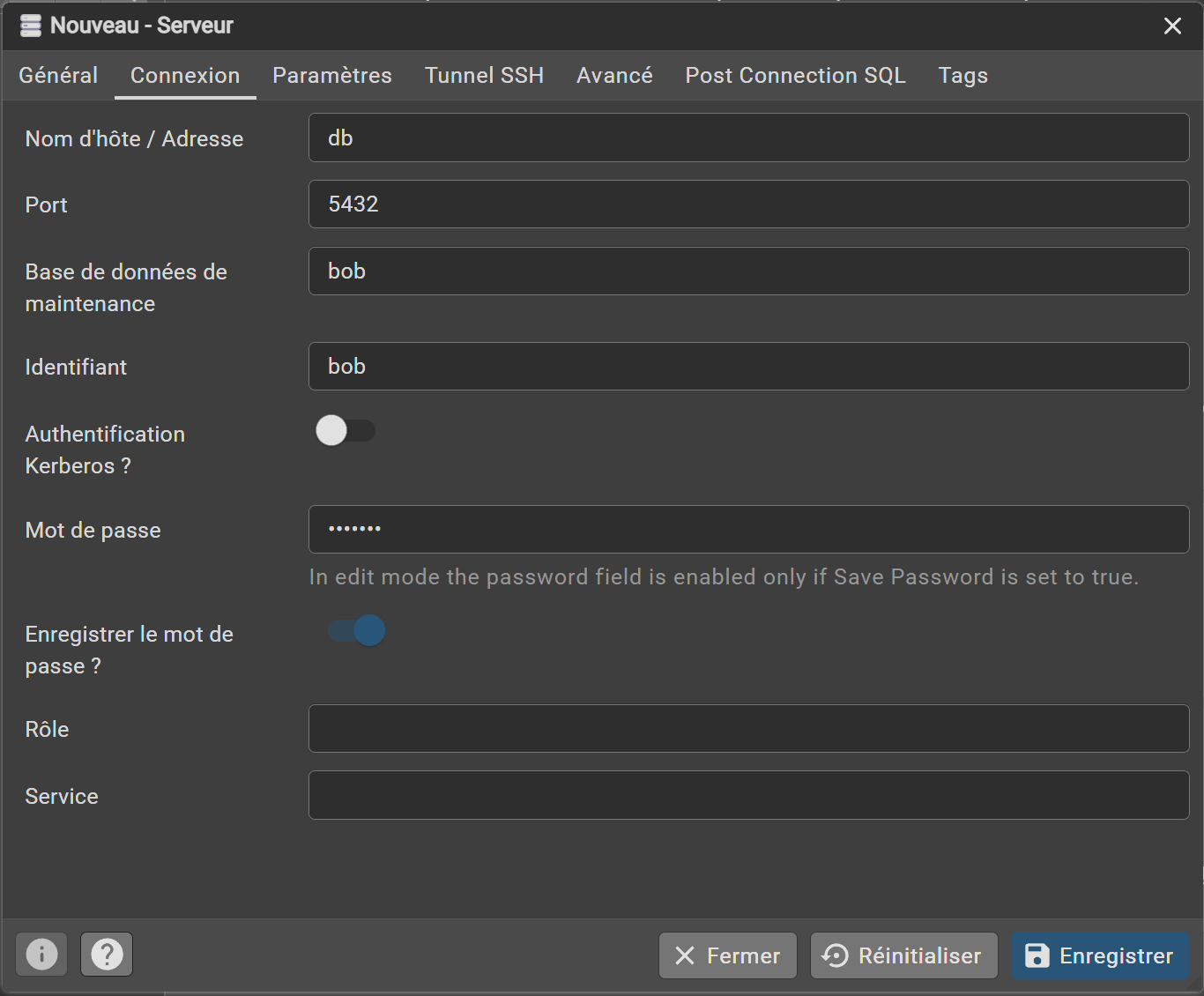
POSTGRES_USER=bob
POSTGRES_PASSWORD=binette
POSTGRES_DB=bob

PGADMIN_EMAIL=admin@admin.com
PGADMIN_PASSWORD=password
- Login et ajout (register) de la bd sous pgadmin:
a) - Login

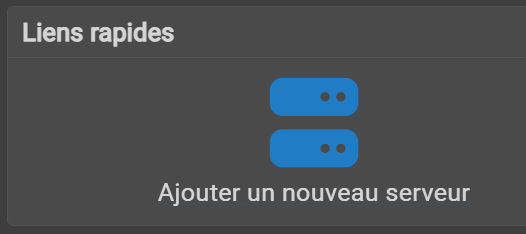
b) - Ajouter un nouveau serveur
c) - Renseigner les paramètres de connexion
9. healthcheck — Explication détaillée
Le healthcheck permet à Docker de surveiller l’état de santé d’un conteneur, au-delà du simple fait qu’il tourne. Un conteneur peut être démarré mais pas encore prêt à accepter des connexions.
test
test: ["CMD-SHELL", "pg_isready -U ${POSTGRES_USER}"]
Définit la commande à exécuter pour tester la santé du conteneur. Il existe deux formes :
| Forme | Description |
|---|---|
CMD |
Exécute la commande directement, sans shell |
CMD-SHELL |
Exécute la commande via /bin/sh -c, permet les variables et opérateurs shell |
pg_isready est un utilitaire fourni avec PostgreSQL qui vérifie si le serveur accepte des connexions. Il retourne :
- exit code 0 → le serveur est prêt ✅
- exit code 1 → le serveur refuse les connexions ❌
- exit code 2 → aucune réponse ❌
Docker considère le conteneur healthy uniquement si le code de retour est 0.
interval
interval: 5s
Fréquence à laquelle Docker exécute le test. Ici toutes les 5 secondes.
timeout
timeout: 5s
Durée maximale accordée à la commande de test pour s’exécuter. Si elle dépasse 5 secondes, Docker considère le test comme échoué.
retries
retries: 5
Nombre d’échecs consécutifs avant de marquer le conteneur comme unhealthy. Ici Docker tolère 5 échecs avant de déclarer le conteneur défaillant.
Cycle de vie d’un conteneur avec healthcheck
démarrage → starting
              ↓
         test échoue (jusqu'à 5 fois)
              ↓
         test réussit → healthy   ← depends_on condition: service_healthy attend cet état
              ↓
         test échoue 5 fois de suite → unhealthy
Paramètre optionnel : start_period
healthcheck:
  test: ["CMD-SHELL", "pg_isready -U ${POSTGRES_USER}"]
  interval: 5s
  timeout: 5s
  retries: 5
  start_period: 10s   # ← délai de grâce au démarrage
Pendant le start_period, les échecs ne sont pas comptabilisés dans les retries. Utile pour les services qui mettent du temps à initialiser (ex: PostgreSQL qui restaure une grosse base).
Crédits
Document rédigé par Alain Boudreault © 2021-2026
Version 2026.02.26.1
Site par ve2cuy